The Problem
My homelab’s Pi-hole has been using ISP’s DNS resolver as its upstream for a long time and working really well. However, I found that connecting to certain websites became much slower at night. These sites are Github, Steam, X, Reddit, and many others.
After digging a little bit, I found all of these sites are at least partially behind Fastly, and this issue went away when I used other upstream DNS resolvers.
$ dig +short www.redditstatic.com @168.95.1.1 # ISP DNS
dualstack.reddit.map.fastly.net.
199.232.113.140

$ dig +short www.redditstatic.com @8.8.8.8 # Google Public DNS
dualstack.reddit.map.fastly.net.
151.101.129.140
151.101.65.140
151.101.193.140
151.101.1.140

$ dig +short www.redditstatic.com @1.1.1.1 # Cloudflare DNS
dualstack.reddit.map.fastly.net.
151.101.193.140
151.101.1.140
151.101.65.140
151.101.129.140
Fastly’s authoritative nameservers always answer *.fastly.net with Anycast IPs that will be routed to Singapore, no matter whether it’s the ISP DNS resolver or a recursion lookup done by myself.
Because of some unfortunate circumstances, submarine cables used between Taiwan and nearby countries have been constantly “disconnected” lately. ISP engineer also confirmed that can lead to slow connection during peak hours.
And the reason why changing DNS resolver “works”, is because these different Anycast IPs returned by Google/Cloudflare will be routed to PoPs in Japan at this moment, which are seemingly less congested than the Singapore one.
Normally we wouldn’t know where the IP is by just looking up the Anycast IP’s information online, and traceroute can sometimes spend too much time to run. One faster and more detailed way for Fastly is to poke some URLs with
Fastly-Debug
header (unless they did some manipulation in the VCL).
Before:
$ curl -I -H "Fastly-Debug: 1" https://www.redditstatic.com/shreddit/search-input-desktop-client-css-tgqsYgQD.css -v -4
* Host www.redditstatic.com:443 was resolved.
* IPv6: (none)
* IPv4: 199.232.113.140
*   Trying 199.232.113.140:443...
(...omitted)
fastly-debug-path: (D cache-sin-wsss1830083-SIN 1768739772) (D cache-sin-wsss1830083-SIN 1768739772) ... (omitted)
After changing DNS to 1.1.1.1:
$ curl -I -H "Fastly-Debug: 1" https://www.redditstatic.com/shreddit/search-input-desktop-client-css-tgqsYgQD.css -v -4
* Host www.redditstatic.com:443 was resolved.
* IPv6: (none)
* IPv4: 151.101.129.140, 151.101.1.140, 151.101.65.140, 151.101.193.140
*   Trying 151.101.129.140:443...
(...omitted)
fastly-debug-path: (D cache-tyo11931-TYO 1768706730) (D cache-tyo11931-TYO 1768706730) ... (omitted)
Luckily, we got additional response headers back, and obviously we are hitting the PoP in Tokyo (TYO).
The simple solution is just to switch to a non-ISP DNS resolver and call it a day, but:
- Cloudflare is usually the fastest for me but it doesn’t support EDNS Client Subnet (ECS).
- Google Public DNS supports ECS and has better average latency even for less popular domains due to its super large cache pool. Though I’d rather not use it for some personal reasons.
So, the goal becomes:
- I want to use my ISP DNS resolver whenever possible, except:
- Anything with CNAME pointing to
*.fastly.net.or*.fastly-edge.com.will be sent to1.1.1.1since the lack of ECS support doesn’t affect Fastly here.
The Solution
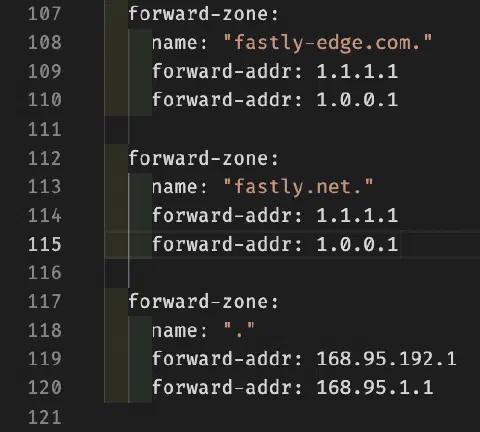
Fortunately, we can easily achieve this by using Unbound :
server:
	# ...(omitted)

	forward-zone:
		name: "fastly-edge.com."
		forward-addr: 1.1.1.1
		forward-addr: 1.0.0.1

	forward-zone:
		name: "fastly.net."
		forward-addr: 1.1.1.1
		forward-addr: 1.0.0.1

	# Everything else goes to ISP DNS by default
	forward-zone:
		name: "."
		forward-addr: 168.95.192.1
		forward-addr: 168.95.1.1
We can confirm this is working as expected by running dig again to my Pi-hole:
$ dig +short www.redditstatic.com
dualstack.reddit.map.fastly.net.
151.101.193.140
151.101.129.140
151.101.65.140
151.101.1.140
Problem solved! Right? Of course not, otherwise this post wouldn’t exist.
“Mysterious” high latency with Unbound
I was happy with this setup for a while until I noticed unusually high latency for a few domains that I can’t reproduce with dig at all. Domains like static.licdn.com and console.aws.amazon.com are even showing >200ms response time.
A few dig later, I still couldn’t figure out why unbound takes so long to resolve these rather popular domains.
Take console.aws.amazon.com as an example:
$ dig console.aws.amazon.com @168.95.1.1
(...omitted)
;; ANSWER SECTION:
console.aws.amazon.com.	1833	IN	CNAME	console.cname-proxy.amazon.com.
console.cname-proxy.amazon.com.	2 IN	CNAME	lbr.us.console.amazonaws.com.
lbr.us.console.amazonaws.com. 2	IN	CNAME	ap-southeast-2.console.aws.amazon.com.
ap-southeast-2.console.aws.amazon.com. 1833 IN CNAME ap-southeast-2.console.cname-proxy.amazon.com.
ap-southeast-2.console.cname-proxy.amazon.com. 2 IN CNAME gr.aga.console-geo.ap-southeast-2.amazonaws.com.
gr.aga.console-geo.ap-southeast-2.amazonaws.com. 2 IN CNAME a716d6d502f17b0e2.awsglobalaccelerator.com.
a716d6d502f17b0e2.awsglobalaccelerator.com. 101	IN A 99.83.202.243
a716d6d502f17b0e2.awsglobalaccelerator.com. 101	IN A 166.117.12.241

;; Query time: 8 msec
;; SERVER: 168.95.1.1#53(168.95.1.1) (UDP)
;; WHEN: Sun Jan 18 15:48:10 CST 2026
;; MSG SIZE  rcvd: 372
These domains have really long CNAME chains for sure, but what could go wrong? Didn’t the upstream resolver already give the whole chain and its final A records?
Even though this seems to be a minor issue considering Pi-hole and Unbound both have their cache, Unbound even has prefetching enabled.
However, I am just too curious to let it go. I was a bit reluctant about enabling Unbound logs because it’s running on my poor Raspberry Pi with a cheap SD card. But I probably couldn’t sleep at night if I don’t figure it out.
I then ran a dig against console.aws.amazon.com and got:
[1768705316] unbound[1:0] info: 127.0.0.1 console.aws.amazon.com. A IN
[1768705316] unbound[1:0] info: resolving console.aws.amazon.com. A IN
[1768705316] unbound[1:0] info: response for console.aws.amazon.com. A IN
[1768705316] unbound[1:0] info: reply from <.> 168.95.192.1#53
[1768705316] unbound[1:0] info: query response was CNAME
[1768705316] unbound[1:0] info: resolving console.aws.amazon.com. A IN
[1768705316] unbound[1:0] info: response for console.aws.amazon.com. A IN
[1768705316] unbound[1:0] info: reply from <.> 168.95.1.1#53
[1768705316] unbound[1:0] info: query response was CNAME
[1768705316] unbound[1:0] info: resolving console.aws.amazon.com. A IN
[1768705316] unbound[1:0] info: response for console.aws.amazon.com. A IN
[1768705316] unbound[1:0] info: reply from <.> 168.95.192.1#53
[1768705316] unbound[1:0] info: query response was CNAME
[1768705316] unbound[1:0] info: resolving console.aws.amazon.com. A IN
[1768705316] unbound[1:0] info: response for console.aws.amazon.com. A IN
[1768705316] unbound[1:0] info: reply from <.> 168.95.1.1#53
[1768705316] unbound[1:0] info: query response was CNAME
[1768705316] unbound[1:0] info: resolving console.aws.amazon.com. A IN
[1768705316] unbound[1:0] info: response for console.aws.amazon.com. A IN
[1768705316] unbound[1:0] info: reply from <.> 168.95.192.1#53
[1768705316] unbound[1:0] info: query response was CNAME
[1768705316] unbound[1:0] info: resolving console.aws.amazon.com. A IN
[1768705316] unbound[1:0] info: response for console.aws.amazon.com. A IN
[1768705316] unbound[1:0] info: reply from <.> 168.95.192.1#53
[1768705316] unbound[1:0] info: query response was CNAME
[1768705316] unbound[1:0] info: resolving console.aws.amazon.com. A IN
[1768705316] unbound[1:0] info: response for console.aws.amazon.com. A IN
[1768705316] unbound[1:0] info: reply from <.> 168.95.192.1#53
[1768705316] unbound[1:0] info: query response was ANSWER
There were 6 different CNAME lookups for a single client query for console.aws.amazon.com, which matched the dig result above. I didn’t understand why Unbound didn’t use the end result from upstream directly and had to check every single layer of the CNAME chain?
I finally went to the doc and found:
…CNAMEs are chased by Unbound itself, asking the remote server for every name in the indirection chain, to protect the local cache from illegal indirect referenced items. A forward-zone entry with name “.” and a forward-addr target will forward all queries to that other server (unless it can answer from the cache).
And it finally clicked. Of course Unbound chases every CNAME along the way, how else could my fastly.net. forward zone work if that’s not the case?
The very reason I use Unbound instead of Pi-hole (dnsmasq under the hood), is precisely because I can’t use --server=/fastly.net/1.1.1.1 to override the resolver. dnsmasq doesn’t care who’s behind the frontmost CNAME like www.redditstatic.com; as long as it gets the final A records, it’s done. What’s in the middle doesn’t bother dnsmasq, just like what dig did here.
Final Thoughts
- Unbound does
CNAME chasing
by default. It is expected and can’t be disabled (not that I want to anyway).
- There was a PR NLnetLabs/unbound Issue #132 discussing this behavior.
- Don’t be ridiculous, just check the logs already.
- Don’t be lazy and actually read the doc.
- Changing DNS might work for now but it’s not a guaranteed fix since, you know, these are Anycast IPs and I don’t control BGP routes.
- In practice, the latency from CNAME chasing is negligible thanks to Pi-hole and Unbound’s caching and prefetching layers.